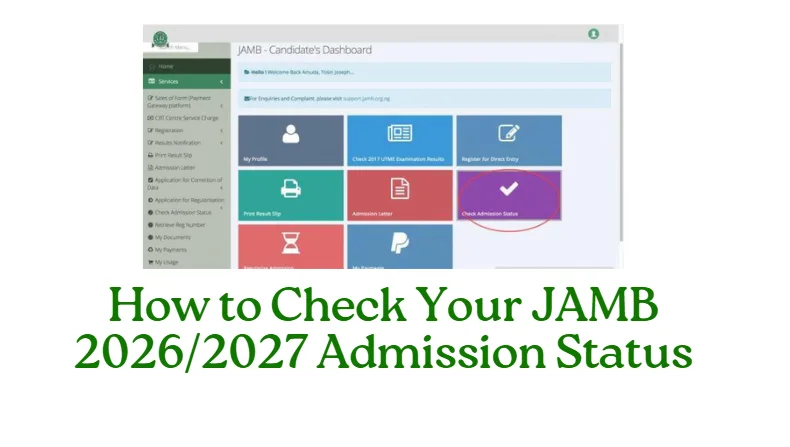

How to Check Your JAMB 2026/2027 Admission Status (Accept or Reject):- The Joint Admissions and Matriculation Board (JAMB) has officially opened the Central Admission Processing System (CAPS) portal for all 2026/2027 UTME and Direct Entry candidates. Through this platform, candidates can now check their admission status and either accept or reject admission offers from universities, polytechnics, and colleges of education in Nigeria. The process is quick and can be completed using a smartphone, tablet, or computer with an internet connection.
Checking your JAMB admission status early is very important because it helps you confirm whether your preferred institution has offered you admission, and it also allows you to respond promptly before the deadline. Candidates who fail to accept their offers on time risk losing their admission completely.
Steps to Check Your JAMB 2026/2027 Admission Status on CAPS
Follow the steps below carefully to check your admission status and accept or reject your offer:
Step 1: Visit the official JAMB eFacility website: https://efacility.jamb.gov.ng
step2: Log in using your registered email address and password.
Step 3: Once logged in, locate and click on “Check Admission Status” on your dashboard.
Step 4: Select your Exam Year (2026) and enter your JAMB Registration Number.
Step 5: Click on “Access my CAPS.”
Step 6: Under the Admission Status section, your details will appear, showing whether you’ve been offered admission.
Step 7: If your admission status says “Congratulations, you have been offered admission”, click Accept Admission to confirm.
Step 8: If you choose not to accept the offer (for example, if you prefer another institution), click Reject Admission.
How to Check Your JAMB 2026/2027 Admission Status
You can also check your admission status using the simplified method on the JAMB portal:
First Step: Go to https://efacility.jamb.gov.ng/CheckAdmissionStatus
Second Step: Enter your JAMB Registration Number and Exam Year.
Third Step: Click on Check Admission Status to view your current standing.
What Happens After Accepting Your Admission
Once you click Accept, your name will appear on the institution’s official admission list, and you can proceed to print your JAMB Admission Letter. This document is required for clearance, registration, and NYSC mobilization in the future.
If you later change your mind after accepting, note that you cannot reverse your decision. Make sure you’re satisfied with your offer before confirming.
What to Do if You Have Not Been Offered Admission Yet
If your status shows “Admission Not Yet Offered,” don’t fear. Admissions are released in batches, so keep checking regularly. In the meantime, ensure that:
- You have uploaded your O’Level results to the JAMB portal.
- Your course and institution choices align with your JAMB score.
- You monitor both the school portal and JAMB CAPS for updates.
Frequently Asked Questions (FAQs)
Can I accept admission on my phone?
Yes. You can access JAMB CAPS using any smartphone with a good browser. Just ensure you switch to desktop mode if the “Accept” or “Reject” buttons don’t appear.
What happens if I reject my admission?
If you reject the offer, JAMB will automatically make your profile available for other schools to consider during the next admission batch.
My admission status says “Not Admitted.” What should I do?
Keep checking your status regularly. Many institutions release multiple batches such as first, second, and supplementary lists.
Do I need to print my admission letter immediately?
Yes. After accepting your admission, print both your JAMB Admission Letter and Original Result Slip for future use.
Can I check admission without email verification?
No. You must have access to the email and password used during JAMB registration to log in to your profile.
Conclusion
Checking your JAMB 2026/2027 admission status is a crucial step in the admission process. Candidates are strongly advised to use only the official JAMB CAPS portal to accept or reject their offers. Avoid any third-party websites or agents claiming to provide admission updates. Always monitor your CAPS account regularly until your admission is confirmed and printed. By following the steps above, you can easily verify your admission status, accept your offer, and begin your academic journey with confidence.
RECOMMENDED POST